

















OpenAI / ChatGPT Shopping – Product Feed
Product feed for ChatGPT shopping: build, deliver, check
Several feeds: languages and currencies
One feed is one OpenAI catalogue, in one language and one currency. Add a feed when OpenAI gives you a catalogue for another language or currency.
Adding a feed
- On the Feed tab, click + Add a feed.
- Type the name of the new feed, and pick its language and currency.
- Click Create the feed.

- The name of the new feed.
- Its language and currency.
- Create the feed.
- What the new feed starts with.
The new feed copies the main feed’s settings. Its delivery starts as Download only: give it an SFTP account of its own on the Upload tab. Its copied choices show ✓ Saved; its copied values (texts, numbers, lists) show Not confirmed yet until you click Confirm or save them.
One SFTP account per feed
OpenAI reads every file of an SFTP account as one catalogue, so two feeds in one account would replace each other’s items. The module refuses an account that another feed already uses, in this shop or in another one. Ask OpenAI for one SFTP account per feed.
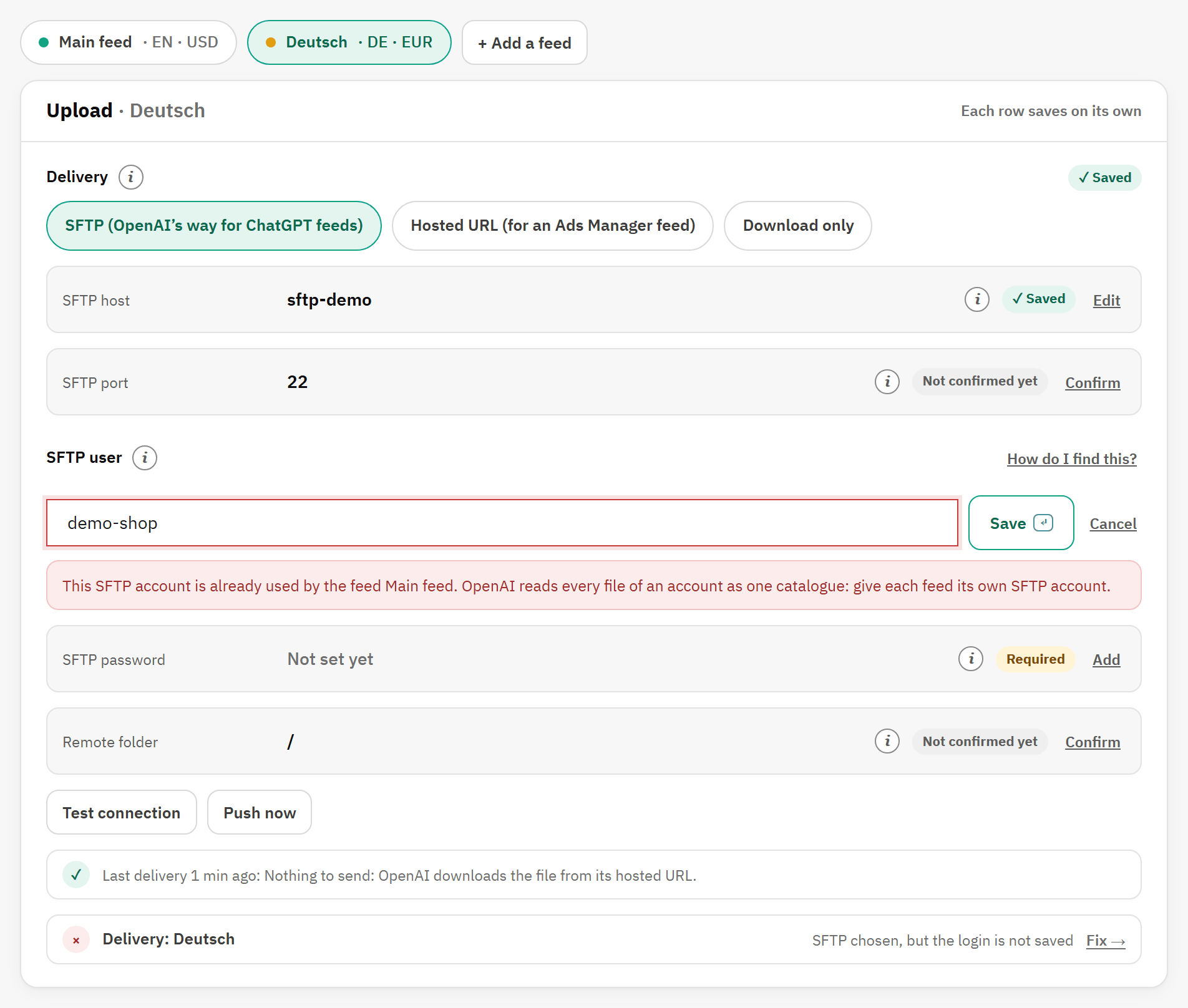
- The refusal, which names the feed that already uses the account.
Switching a feed off, or deleting it
- Feed set to Off: the feed keeps its settings, the job skips it, and its file is deleted from the SFTP server so that OpenAI stops reading it. Switch it on again at any time.
- Delete this feed, on the Feed tab, asks for confirmation. It then deletes the feed’s settings, its files, its build log and its delivery status, and its file on the SFTP server. This cannot be undone.
- The main feed cannot be deleted. Switch it off instead.
Each feed’s addresses
- A hosted feed has its own address, ending in
/chatgpt-feed/<feed>.csv.gz, in the feed’s language. - The feed job builds every feed. To build one feed on its own schedule, use its address under One feed only on the Cron tab: the job’s address with
&id_feed=and the feed’s number.
What the feed contains
The file is a CSV file compressed with gzip (.csv.gz), with the 33 columns of OpenAI’s product spec and one row per item.
The columns
| Column | Value | Required |
|---|---|---|
is_eligible_search | Show these products in ChatGPT search; false for an item that is leaving the feed. | |
is_eligible_checkout | Always false: there is no checkout in ChatGPT. | |
item_id | The product ID, or for a variant the product ID, v and the combination ID. | ✓ |
title | The product name in the feed’s language, with the variant as set in Variant titles. Cut at 150 characters. | ✓ |
description | The chosen description as plain text, cut at Longest description. The name when there is none. | ✓ |
url | The product page, or the variant’s own page, in the feed’s language, with the Link parameters. | ✓ |
brand | From Brand from; the seller name when the shop name stands in. | ✓ |
seller_name | Seller name. | ✓ |
image_url | The cover picture, or the variant’s own first picture. | ✓ |
additional_image_urls | The other pictures, when Extra pictures is Yes. | |
price | The regular price in the feed’s currency, with or without tax. | ✓ |
sale_price | The price after a discount that applies now. | |
availability | in_stock, out_of_stock, backorder or pre_order. | ✓ |
gtin, mpn | From GTIN and MPN. A variant sends its own codes. | |
condition | The product’s condition: new, used or refurbished. | |
product_category | The path of the product’s default category, broad to specific. | |
color, size, material | A variant’s values, from Colour from, Size from and Material from. | |
weight, item_weight_unit | The weight, with the variant’s weight impact, and your shop’s unit. | |
group_id, listing_has_variations, variant_dict | For a variant: its product ID, true, and its attribute groups and values. | |
seller_url | Your shop’s home page, in the feed’s language. | |
seller_privacy_policy, seller_tos, return_policy | Your policy pages: the store’s, or the feed’s own. | |
accepts_returns, return_deadline_in_days | From Returns and the return window. | |
review_count, star_rating | From PrestaShop’s product comments module, when it is on. |
Item IDs and variants
- A product without combinations has its product ID as item ID, such as
7. - A variant has the product ID,
vand the combination ID, such as1v3. - The IDs stay the same from one version of the module to the next, so OpenAI keeps its records.
- A variant has its own title, link, price, pictures (its product’s when it has none), GTIN and MPN.
Availability, prices, pictures and links
| Availability | in_stock with stock; out_of_stock without; backorder when the product can be ordered at zero stock; pre_order when it can be ordered and has an availability date in the future. |
|---|---|
| Prices | In the feed’s currency, with its decimals, with or without tax. When a discount applies now, price is the regular price and sale_price the price after the discount. |
| Pictures | The cover first, then the other pictures when Extra pictures is Yes, in the chosen Picture size. |
| Links | The product page in the feed’s language and shop, with the Link parameters. |
| Returns | As set in Returns (see Step 1 of 5: Your store). |
| Reviews | From PrestaShop’s product comments module, when it is on: the number of reviews and the average rating. |
Rows that are left out
A product is never sent when:
- it is switched off, or not in the shop;
- its visibility is Nowhere or Search only;
- it cannot be ordered;
- its price is zero or less;
- it has no picture;
- it has no brand, unless Use the shop name when a product has no brand is Yes.
Price, picture and brand are values OpenAI requires. The module counts what each of them leaves out, and shows the counts in three places:
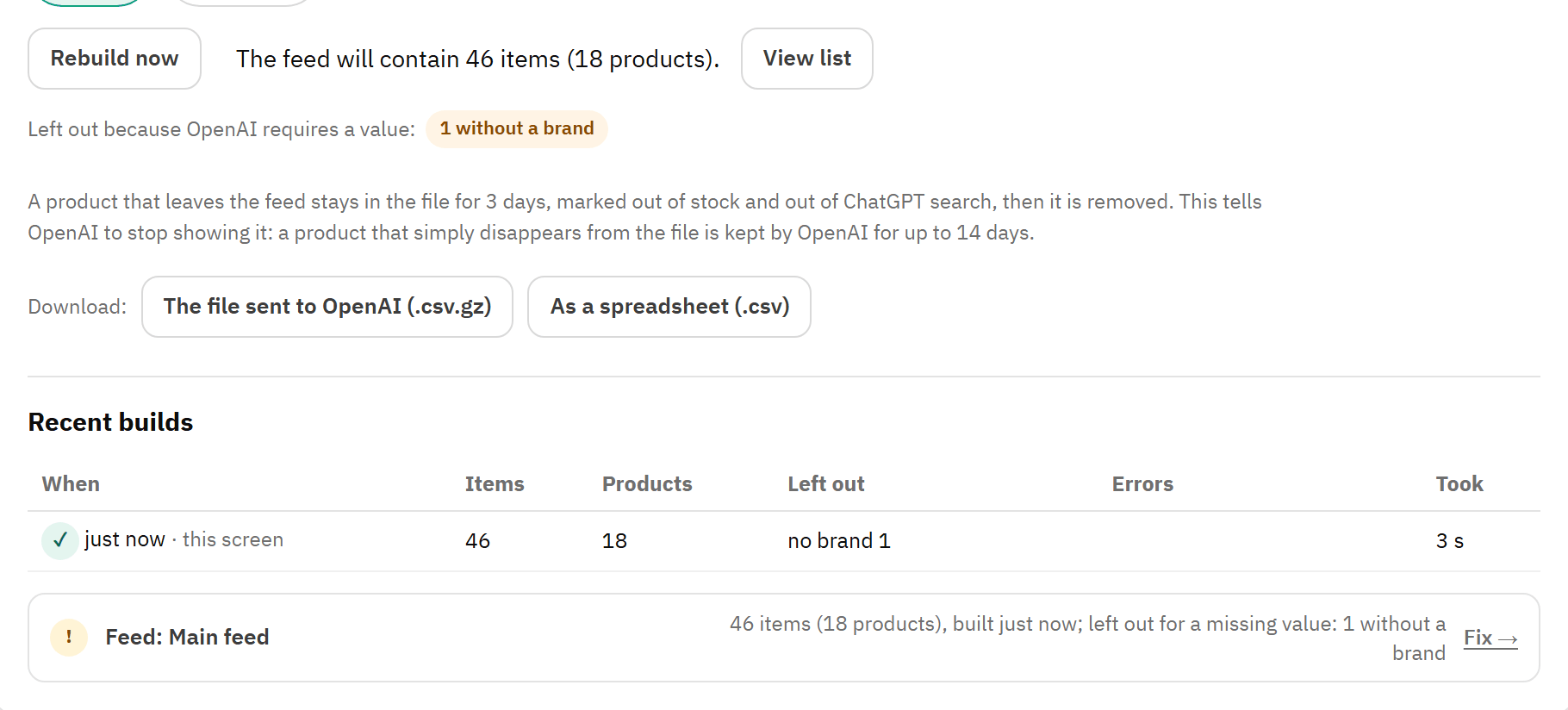
- The count under the rows: “1 without a brand”.
- Left out in Recent builds.
- The Feed: line of Health, with a warning and Fix →.
Give the product what it is missing, then click Rebuild now: the count goes back to zero.
Products that leave the feed
OpenAI keeps an item that simply disappears from the file for up to 14 days, still in stock and at its old price. So when a product leaves your feed (a filter now leaves it out, it was switched off or deleted, it sold out while out-of-stock products are left out, or it lost a required value), the module does not drop it at once. It stays in the file for 3 days, marked out of stock and out of ChatGPT search, then it is removed. OpenAI stops showing it at its next processing.
A product that comes back within the 3 days is sent as before. While items are in their 3 days, the Feed tab shows how many: Leaving the feed right now: and the number.
Downloads
On the Feed tab, The file sent to OpenAI (.csv.gz) downloads the exact file, and As a spreadsheet (.csv) the same rows as a plain CSV file. Only the delivered .csv.gz file is what OpenAI reads. These downloads work only from your back office.